Plain markdown. Open format. No vendor lock-in — ever. All processing happens on your device: semantic search understands concepts, OCR makes images searchable, everything works offline. When you sync, your data travels only as unreadable ciphertext — end-to-end encrypted, readable by no one but you. Organization optional. Finding anything — even in chaos — is not.
This app exists because of frustration. Real frustration.
Everything you need to build and navigate your knowledge base—and find what you need, even if you forgot where you put it
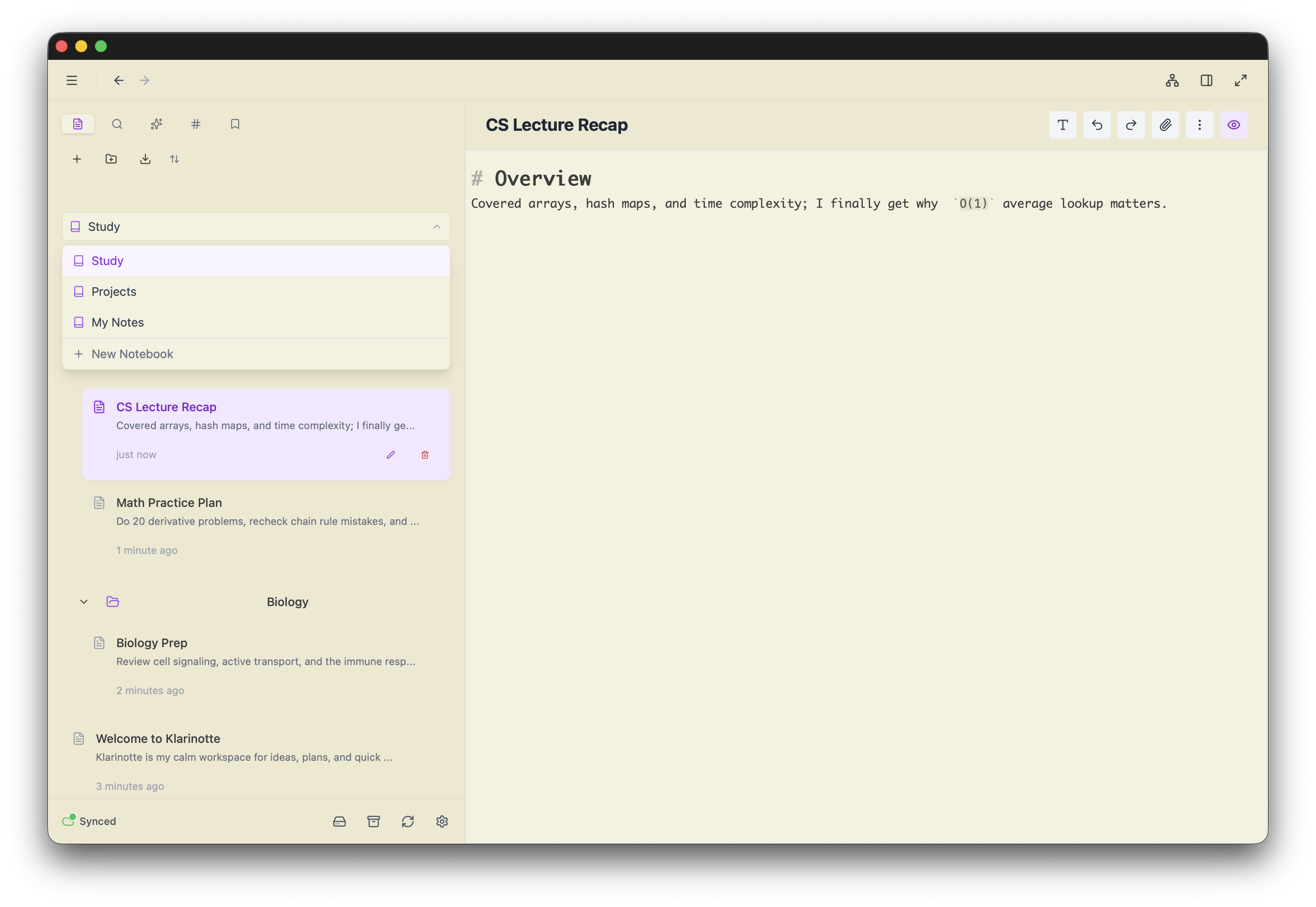
Write with a powerful CodeMirror-based editor supporting full markdown syntax, syntax highlighting, live preview, and math equations with KaTeX.
Connect your thoughts with bidirectional links using double bracket syntax. Build a network of interconnected ideas that evolve with your thinking.
Visualize your entire knowledge base as an interactive network. Discover hidden connections and explore relationships between your notes.
Write in plain markdown—what you write is what you get. No format conversions, no hidden processing. Export your data exactly as you wrote it. Plain, transparent, human-readable. Your notes, your format, your control. Forever.
Organize notes with a flexible tagging system. Use nested tags to create hierarchies and filter notes by multiple criteria.
Search by concept, not just keywords. Too lazy to organize your notes? Don't know the exact words you used? No problem. Find relevant information even in your most chaotic, jotted-down, unorganized notes.
Screenshot that article? Photo of a whiteboard? Image with text? Make it searchable. OCR isn't about extracting perfect text—it's about finding the image when you need it. Search your visual information just like your notes.
Find anything instantly with powerful full-text search across all your notes. Support for boolean operators and advanced filtering.
Gracefully renders mixed bidirectional text without messing up the visual order of the sentence.
By default, the cursor does not blink. No need to search for settings to disable the annoying blink. Enjoy a calm, distraction-free writing experience.
Bookmark entire notes or specific sections within notes. Quick access to your most important content without searching.
Intelligent autocomplete for wikilinks and tags. Start typing and get instant suggestions for linking notes or adding tags.
Your notes are stored as plain markdown documents on your local device. When sync is enabled (strongly recommended), your notes are encrypted end to end before they leave your device, so the server only ever sees unreadable ciphertext. All processing happens locally—OCR, semantic search, everything. We will never have a feature that sends your data to the cloud unencrypted. No server sees your notes, ever. No cloud lock-in, no proprietary formats, absolute privacy. Your knowledge belongs to you.
We're all lazy. We jot things down, paste snippets, dump thoughts—then never organize them. And that's okay. With semantic search, you don't need to remember exact keywords. With OCR, even your screenshots become searchable. Find what you need in the chaos, not despite it. Organization is optional; finding information is not.
Note-taking, retrieval, searching—everything should be instant and effortless. No barriers, no hassle. Just open your browser and start writing. Built for speed with local-first architecture, instant search, and a clean, distraction-free interface. Pick up where you left off from any device. Find information in the clutter. Write in plain markdown, no learning curve required.
Everything you need to start taking notes and finding them later
+ New Note buttonWatch the videos: a two-minute tour and short speed tips.
Link notes together using double brackets:
[[Note Title]]
For notes in folders, include the path:
[[Folder/Note Title]]
Links autocomplete as you type. View backlinks in the sidebar to see which notes reference the current note.
Add tags anywhere in your notes with hashtags:
#project #work/meeting
Use nested tags with forward slashes to create hierarchies. Click any tag to filter notes.
Frictionless note-taking means working your way. Customize all keyboard shortcuts to match your workflow.
Change hotkeys for creating notes, searching, switching views, and any other action—make the app feel like an extension of your thoughts.
# Heading 1
**bold** *italic* ~~strikethrough~~
- Bulleted list
1. Numbered list
- [ ] Task list
```javascript
code block
```
No. You can start writing immediately. Your notes live on your device. An account is only needed if you want end-to-end encrypted sync across devices, or shared notebooks.
Yes. Klarinotte is local-first — everything you write is stored on your device, and the app itself is cached in your browser after the first visit, so you can open it and keep working with no connection. When you come back online, sync catches up automatically.
Two caveats on the web version:
The desktop app has neither caveat: it is installed locally and always works offline.
Yes. The web app works fully on mobile browsers, with the same features as on desktop. For a better experience, install it as a web app and add it to your home screen:
This gives the app its own icon and a full-screen, app-like experience.
On your device — in your browser's local storage (IndexedDB) on the web, or in the app's local data directory on desktop. If you enable sync, an encrypted copy is also stored on our servers; we cannot read it.
Open Settings → Data:
You can also export a single note or folder from its right-click menu (Export…), as Markdown, HTML, or PDF. Those keep the content but not the metadata, so they're good for sharing, not for a full backup.
We recommend exporting regularly. Notes are plain Markdown, readable in any text editor — with or without Klarinotte.
On the web version, clearing site data, cookies, or "browsing data" for Klarinotte deletes your local notes. Some browsers also evict site storage automatically when disk space runs low, or after long periods of inactivity in private/strict privacy modes.
You are protected against this if either of the following is true:
If neither is true, cleared data is gone. Two things reduce the risk: keep regular exports or install the desktop app.
Yes. Deleted notes go to the trash and can be restored. They're only removed permanently when you empty the trash (unless you've chosen Delete permanently in Settings).
Your notes are on your device, so they don't disappear when the service does.
That is why we recommend regular exports: plain Markdown files that open anywhere. We designed against vendor lock-in, and exports are your safety net.
Put your notes in a ZIP and import it via Settings → Data → Import Notebook. The expected structure is:
.md) in the root of the ZIP or in any subfolder — your folder structure is preserved.assets at the top level of the ZIP.assets folder name before the file name — for example [my picture](assets/pic.png) or .Klarinotte's own export uses exactly this layout (plus a hidden metadata file), so its ZIPs always re-import cleanly. Notes coming from another Markdown app usually just need their attachment folder renamed to assets and their links adjusted to match.
You can reset it through a standard email verification flow. When you signed up you were given a Recovery Key — if you saved it, use it during the reset to recover all your encrypted data. If you didn't save it, recreate and save it before it's too late. Your master encryption key is re-protected with your new password, and nothing is lost.
If you lost both your password and your Recovery Key, the encrypted data on the server is unrecoverable: the account can be reset, but the synced data is wiped. Your local copy still works. This is the tradeoff of real end-to-end encryption — we can never access your data on the server, not even to help you recover it.
All encrypted data on our servers is permanently deleted. Your local copy remains accessible.
You can always use the app locally, without an account and without limits. There is also a free sync tier: up to 250 synced items (notes + attachments combined), 50 MB of synced storage, and 2 devices. Paid plans with higher quotas will be available.
All of them. End-to-end encrypted sync, semantic search, OCR for images, shared notebooks, and the full Markdown editor are available on every tier. The tier only caps how much you can sync and how many devices you can connect.
Yes — 25 MB per file on the free tier, 100 MB on paid plans. The same limit applies to very large notes (e.g. notes with many inline images), though most notes are far below it. Files above the limit are still saved locally so you can keep working with them; they just don't sync.
Such files show a small red cloud icon next to their name (in the file explorer and at the top of the open note), and a count badge appears on the sync indicator. After upgrading, the next sync retries automatically and the icon clears once the upload succeeds.
Yes. With sync enabled, changes propagate across devices. Each device keeps a full local copy, and concurrent edits are merged automatically. You can write on your laptop and pick up on your phone.
Yes. You can share a notebook with other Klarinotte users by inviting them via email. Shared notebooks stay end-to-end encrypted — each member receives a securely wrapped copy of the notebook key. You can assign roles (editor or viewer) and remove members at any time. The owner retains full control.